

Give memory to your API: Build a complete CRUD with DynamoDB and CDK
In the previous articles, we gradually introduced you to serverless, starting with the creation and deployment of a Lambda function in the first article, followed by the addition of an API Gateway to trigger the Lambda in the second article. In both cases, the returned data consisted of simple mock responses. You have therefore acquired a solid foundation to move on to the next level: data persistence. As stated in the title, we will use DynamoDB and remain within the same approach: the discovery of AWS CDK.
Goal
Based on the previous tutorials, we will create: A DynamoDB table for storing our tasks in the database.
- GET
/tasks—-> A route for retrieving tasks from the database. - POST
/tasks—-> A route for save tasks in database - PUT
/tasks/:id—> A route for updating the information of a task. - DELETE
/tasks/:id—> A route for deleting a task.
CThis API encompasses the essential elements for creating modern, robust, and scalable applications.
Prerequisites
Before getting started, it is recommended that:
- You have read the articles:
1. Initialize the CDK project
Create a folder for your project:
mkdir serverless-rest-api-demo
cd serverless-rest-api-demoInitialize a TypeScript CDK project:
cdk init app --language typescriptCDK creates the following structure:
/bin
/lib
cdk.json
tsconfig.json
package.json2. Creating the DynamoDB table
In our file /lib/serverless-rest-api-demo-stack.ts let’s declare our Tasks Table
import * as cdk from 'aws-cdk-lib/core';
import { Construct } from 'constructs';
import * as dynamodb from 'aws-cdk-lib/aws-dynamodb';


export class ServerlessRestApiDemoStack extends cdk.Stack {
  constructor(scope: Construct, id: string, props?: cdk.StackProps) {
    super(scope, id, props);

    const tasksTable = new dynamodb.Table(this, 'TasksTable', {
      partitionKey: { name: 'taskId', type: dynamodb.AttributeType.STRING },
      tableName: 'Tasks',
      removalPolicy: cdk.RemovalPolicy.DESTROY, // NOT recommended for production code
      billingMode: dynamodb.BillingMode.PAY_PER_REQUEST
    });
  }
}In this section of our CDK Stack, we define our storage table. Here are the details of what each line of code does:
partitionKey: This serves as the unique identifier for each task. In DynamoDB, a partition key is required. Here, we have chosentaskIdof typeSTRING. This key allows us to retrieve, update, or delete a specific task.tableName: 'Tasks': We give our DynamoDB table a name so that it can be easily identified in the AWS console.removalPolicy: cdk.RemovalPolicy.DESTROY: ** Note: This is for tutorial purposes only!** By default, AWS retains your tables even if you delete your CDK stack (to prevent accidental data loss). Here, we explicitly instruct AWS to delete the table along with the stack to avoid paying for unused resources after your tests.billingMode: dynamodb.BillingMode.PAY_PER_REQUEST: This is the billing mode. Instead of paying a monthly fee, you only pay when you read or write data. For beginners or small projects, this is the most cost-effective option.
3. Create the Lambda functions
Ceate a /lambda/ folder and the following files:
create-tasks.tsget-task.tsdelete-task.tslist-tasks.ts
Warning
Let’s install the packages that will make it easier to interact with our DynamoDB table and generate IDs.
npm install @aws-sdk/lib-dynamodb
npm install uuid1. Creating a task
import { DynamoDBClient } from "@aws-sdk/client-dynamodb";
import { PutCommand ,DynamoDBDocumentClient} from "@aws-sdk/lib-dynamodb";
import { v4 as uuidv4 } from 'uuid';

const client= new DynamoDBClient({});
const docClient =  DynamoDBDocumentClient.from(client);
const TABLE_NAME = process.env.TABLE_NAME || 'Tasks';

export const handler = async (event: any) => {
    const requestBody = JSON.parse(event.body);

    const taskItem = {
        taskId: uuidv4(),
        title: requestBody.title,
        taskStatus: requestBody.taskStatus,
        createdAt: new Date().toISOString()
    };

    try {
        await docClient.send(new PutCommand({
            TableName: TABLE_NAME,
            Item: taskItem
        }));

        return {
            statusCode: 201,
            body: JSON.stringify({ message: 'Task created successfully', task: taskItem })
        };
    } catch (error) {
        console.error('Error creating task:', error);
        return {
            statusCode: 500,
            body: JSON.stringify({ message: 'Failed to create task' })
        };
    }
}- Client initialization: We set up the connection to DynamoDB using the
DynamoDBDocumentClient - Preparing the data :
- We convert the received text (
event.body) into a usable object. - OWe generate a unique ID (
uuid4) so that each task is properly identified. - We add an automatic creation date.
- We convert the received text (
- **Saving (
PutCommand): We send thetaskItemobject to the DynamoDB table. This is the actual write operation. - API response:
- Success (201): We confirm to the client that the task has been created with its new ID.
- Failure (500): We catch the error if something goes wrong (e.g., a permissions issue) to prevent the API from crashing without explanation.
2. Tasks’s List
import { DynamoDBClient, ScanCommand } from "@aws-sdk/client-dynamodb";
import {  DynamoDBDocumentClient} from "@aws-sdk/lib-dynamodb";


const client= new DynamoDBClient({});
const docClient =  DynamoDBDocumentClient.from(client);
const TABLE_NAME = process.env.TABLE_NAME || 'Tasks';

export const handler = async (event: any) => {
   try {
       // Scan the DynamoDB table to get all tasks
       const data= await docClient.send( new ScanCommand({
           TableName: TABLE_NAME
       }));

       return {
           statusCode: 200,
           body: JSON.stringify({ tasks: data.Items })
       };
   } catch (error) {
       console.error('Error listing tasks:', error);
       return {
           statusCode: 500,
           body: JSON.stringify({ message: 'Failed to list tasks' })
       };
   }
}Code explanation: Listing all tasks This function acts as an inventory of your database:
ScanCommand: This is the instruction that tells DynamoDB to read the entire table. It is the most direct method to retrieve all the data at once.data.Items: The result of the scan contains an array calledItems. This is where all our tasks are stored (ID, title, status, etc.).Error handling:If the table is inaccessible or if the name is incorrect.
Warning
The Scan command is ideal for learning purposes and for small tables. However, keep in mind that it scans each item in the table one by one. We will see later that there is a more efficient command, Query.
3. Retrieving a task
// code for lambda/get-task.ts
import { DynamoDBClient } from "@aws-sdk/client-dynamodb";
import { DynamoDBDocumentClient ,GetCommand} from "@aws-sdk/lib-dynamodb";

const client = new DynamoDBClient({});
const docClient = DynamoDBDocumentClient.from(client);
const TABLE_NAME = process.env.TABLE_NAME || 'Tasks';

export const handler = async (event: any) => {
    const taskId = event.pathParameters?.taskId;

    if (!taskId) {
        return {
            statusCode: 400,
            body: JSON.stringify({ message: 'Task ID is required' })
        };
    }

    try {
        const data = await docClient.send(new GetCommand({
            TableName: TABLE_NAME,
            Key: { taskId }
        }));

        if (!data.Item) {
            return {
                statusCode: 404,
                body: JSON.stringify({ message: 'Task not found' })
            };
        }

        return {
            statusCode: 200,
            body: JSON.stringify({ task: data.Item })
        };
    } catch (error) {
        console.error('Error getting task:', error);
        return {
            statusCode: 500,
            body: JSON.stringify({ message: 'Failed to get task' })
        };
    }
}This function allows us to retrieve a specific item from our database
- ID extraction: The code retrieves the
taskIddirectly from the URL usingevent.pathParameters. - Input validation: If the ID is missing, we immediately return a 400 error (Bad Request).
GetCommand: This is the fastest and least expensive command in DynamoDB. It directly retrieves the item using its unique key.- Existence check: If DynamoDB finds nothing, it returns an empty object. The code checks the contents of
data.Itemto return a 404 response (Not Found), which is the standard behavior for a well-designed REST API.
3. Deleting task
// code for lambda/delete-task.ts
import { DynamoDBClient } from "@aws-sdk/client-dynamodb";
import { DynamoDBDocumentClient, DeleteCommand } from "@aws-sdk/lib-dynamodb";

const client = new DynamoDBClient({});
const docClient = DynamoDBDocumentClient.from(client);
const TABLE_NAME = process.env.TABLE_NAME || 'Tasks';

export const handler = async (event: any) => {
    const taskId = event.pathParameters?.taskId;

    if (!taskId) {
        return {
            statusCode: 400,
            body: JSON.stringify({ message: 'Task ID is required' })
        };
    }

    try {
        await docClient.send(new DeleteCommand({
            TableName: TABLE_NAME,
            Key: { taskId }
        }));

        return {
            statusCode: 200,
            body: JSON.stringify({ message: 'Task deleted successfully' })
        };
    } catch (error) {
        console.error('Error deleting task:', error);
        return {
            statusCode: 500,
            body: JSON.stringify({ message: 'Failed to delete task' })
        };
    }
}Explanation Deletion is the final action in our data cycle. It is very similar to retrieving (Get), but with a different purpose.
- Identification: As with
Get, we extract thetaskIdfrom the URL parameters. This acts as a safety key to ensure we delete the correct item. DeleteCommand: This command instructs DynamoDB to permanently remove the item associated with the provided key.- Resilience: If you attempt to delete an ID that does not exist, the command will still succeed without an error. This is known as an idempotent operation.
- Confirmation: We return a success message to confirm to the user that the action has been successfully processed.
4. Dynamic Update
// code for lambda/update-task.ts
import { DynamoDBClient } from "@aws-sdk/client-dynamodb";
import { DynamoDBDocumentClient, UpdateCommand } from "@aws-sdk/lib-dynamodb";

const client = new DynamoDBClient({});
const docClient = DynamoDBDocumentClient.from(client);
const TABLE_NAME = process.env.TABLE_NAME || 'Tasks';

export const handler = async (event: any) => {
    const taskId = event.pathParameters?.taskId;
    const requestBody = JSON.parse(event.body);

    if (!taskId) {
        return {
            statusCode: 400,
            body: JSON.stringify({ message: 'Task ID is required' })
        };
    }

    const updateExpressionParts = [];
    const expressionAttributeValues: any = {};

    if (requestBody.title) {
        updateExpressionParts.push('title = :title');
        expressionAttributeValues[':title'] = requestBody.title;
    }

    if (requestBody.taskStatus) {
        updateExpressionParts.push('taskStatus = :taskStatus');
        expressionAttributeValues[':taskStatus'] = requestBody.taskStatus;
    }

    if (updateExpressionParts.length === 0) {
        return {
            statusCode: 400,
            body: JSON.stringify({ message: 'No valid fields to update' })
        };
    }

    const updateExpression = 'SET ' + updateExpressionParts.join(', ');

    try {
        const data = await docClient.send(new UpdateCommand({
            TableName: TABLE_NAME,
            Key: { taskId },
            UpdateExpression: updateExpression,
            ExpressionAttributeValues: expressionAttributeValues,
            ReturnValues: 'ALL_NEW'
        }));

        return {
            statusCode: 200,
            body: JSON.stringify({ message: 'Task updated successfully', task: data.Attributes })
        };
    } catch (error) {
        console.error('Error updating task:', error);
        return {
            statusCode: 500,
            body: JSON.stringify({ message: 'Failed to update task' })
        };
    }
}
Explanation
Unlike PutCommand, which replaces the entire object, UpdateCommand allows you to modify only the fields provided by the users (such as the title, the status, or both).
- Dynamic construction: The code checks what is present in the
requestBody. If only the title is provided, it updates only the title. This prevents accidentally overwriting other data. UpdateExpression: It’s a small “magic” statement (e.g., SET title = :title) that tells DynamoDB exactly what to modify.ExpressionAttributeValues: For security reasons, we do not place the values directly in the statement. Instead, we use “aliases” (like :title) to safely inject the data.ReturnValues: 'ALL_NEW': It asks DynamoDB to return the object after the modification.
4. Creating routes
In this section, we will create our API Gateway and associate each Lambda function with a specific route.
import * as cdk from 'aws-cdk-lib/core';
import { Construct } from 'constructs';
import * as dynamodb from 'aws-cdk-lib/aws-dynamodb';
import * as apiGateway from 'aws-cdk-lib/aws-apigateway';
import* as lambdaNodejs from 'aws-cdk-lib/aws-lambda-nodejs';

export class ServerlessRestApiDemoStack extends cdk.Stack {
  constructor(scope: Construct, id: string, props?: cdk.StackProps) {
    super(scope, id, props);

    const tasksTable = new dynamodb.Table(this, 'TasksTable', {
      partitionKey: { name: 'taskId', type: dynamodb.AttributeType.STRING },
      tableName: 'Tasks',
      removalPolicy: cdk.RemovalPolicy.DESTROY, // NOT recommended for production code
      billingMode: dynamodb.BillingMode.PAY_PER_REQUEST
    });

    // Lambda function to create a task
    const createTaskFunction = new lambdaNodejs.NodejsFunction(this, 'CreateTaskFunction', {
      entry: 'lambda/create-task.ts',
      handler: 'handler',
      functionName: 'CreateTaskFunction',
      environment: {
        TABLE_NAME: tasksTable.tableName
      }
    });

    // Grant the Lambda function permissions to write to the DynamoDB table
    tasksTable.grantWriteData(createTaskFunction);

    // Lambda function to list tasks
    const listTasksFunction = new lambdaNodejs.NodejsFunction(this, 'ListTasksFunction', {
      entry: 'lambda/list-tasks.ts',
      handler: 'handler',
      functionName: 'ListTasksFunction',
      environment: {
        TABLE_NAME: tasksTable.tableName
      }
    });

    // Grant the Lambda function permissions to read from the DynamoDB table
    tasksTable.grantReadData(listTasksFunction);

    // Lambda function to get a single task
    const getTaskFunction = new lambdaNodejs.NodejsFunction(this, 'GetTaskFunction', {
      entry: 'lambda/get-task.ts',
      handler: 'handler',
      functionName: 'GetTaskFunction',
      environment: {
        TABLE_NAME: tasksTable.tableName
      }
    });

    // Grant the Lambda function permissions to read from the DynamoDB table
    tasksTable.grantReadData(getTaskFunction);

    // Lambda function to delete a task
    const deleteTaskFunction = new lambdaNodejs.NodejsFunction(this, 'DeleteTaskFunction', {
      entry: 'lambda/delete-task.ts',
      handler: 'handler',
      functionName: 'DeleteTaskFunction',
      environment: {
        TABLE_NAME: tasksTable.tableName
      }
    });

    // Grant the Lambda function permissions to delete from the DynamoDB table
    tasksTable.grantWriteData(deleteTaskFunction);

    // Lambda function to update a task
    const updateTaskFunction = new lambdaNodejs.NodejsFunction(this, 'UpdateTaskFunction', {
      entry: 'lambda/update-task.ts',
      handler: 'handler',
      functionName: 'UpdateTaskFunction',
      environment: {
        TABLE_NAME: tasksTable.tableName
      }
    });

    // Grant the Lambda function permissions to update the DynamoDB table
    tasksTable.grantWriteData(updateTaskFunction);

    // create Api Gateway and Lambda functions here
    const api = new apiGateway.RestApi(this, 'TasksApi', {
      restApiName: 'Tasks Service',
      description: 'This service serves tasks.'
    });
    // create tasks resource
    const tasks = api.root.addResource('tasks');

    // POST /tasks - create a new task
    tasks.addMethod('POST', new apiGateway.LambdaIntegration(createTaskFunction));

    // GET /tasks - list all tasks
    tasks.addMethod('GET', new apiGateway.LambdaIntegration(listTasksFunction));

    // /tasks/{taskId} resource
    const singleTask = tasks.addResource('{taskId}');

    // GET /tasks/{taskId} - get a single task
    singleTask.addMethod('GET', new apiGateway.LambdaIntegration(getTaskFunction));

    // DELETE /tasks/{taskId} - delete a task
    singleTask.addMethod('DELETE', new apiGateway.LambdaIntegration(deleteTaskFunction));

    // PUT /tasks/{taskId} - update a task
    singleTask.addMethod('PUT', new apiGateway.LambdaIntegration(updateTaskFunction));

    // Output the API endpoint URL
    new cdk.CfnOutput(this, 'ApiUrl', {
      value: api.url,
      description: 'The URL of the Tasks API'
    });
  }
}Explanation: As a new feature here, we have
 // Lambda function to create a task
    const createTaskFunction = new lambdaNodejs.NodejsFunction(this, 'CreateTaskFunction', {
      entry: 'lambda/create-task.ts',
      handler: 'handler',
      functionName: 'CreateTaskFunction',
      environment: {
        TABLE_NAME: tasksTable.tableName
      }
    });

    // Grant the Lambda function permissions to write to the DynamoDB table
tasksTable.grantWriteData(createTaskFunction);environmentIn the Lambda function definition, we add an environment variableTABLE_NAMEto our function, which is then accessed in the code usingconst TABLE_NAME = process.env.TABLE_NAME.tasksTable.grantWriteData(createTaskFunction);Give the Lambda function the necessary permissions to write to the DynamoDB table.
Summary whe have
- Created Lambda functions :
createTaskFunction,listTasksFunction,getTaskFunction,updateTaskFunctionetdeleteTaskFunction - Created the API Gateway :
api - Created routes:
/taskset/tasks/{taskId}, association aux lambdas - Created the DynamoDB table
Warning
Execute cmd npm install -D esbuild
esbuild helps with transpiling TypeScript to JavaScript; otherwise, a Docker image would be used for transpilation, which would make the deployment longer
5. Déployer la Lambda
before deploy:
cdk bootstrap
cdk synth

cdk deploy 5. Testing functions
After deployment, the console provides a link to invoke the Lambda functions.
Go to the AWS console to explore the API Gateway resource.

Test using tools like Postman
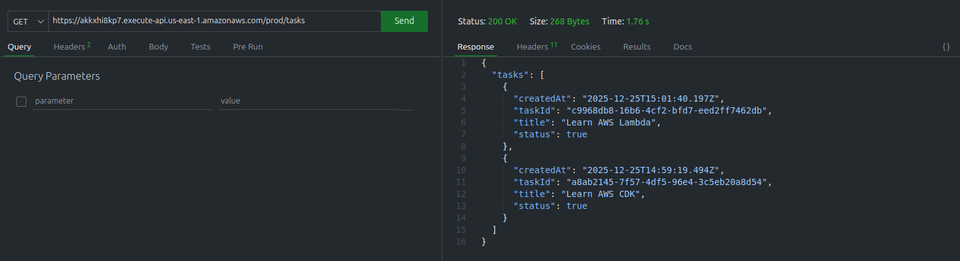
- List all tasks (initially, it is empty).

Add task
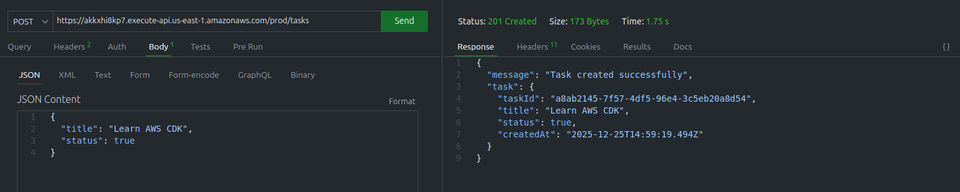
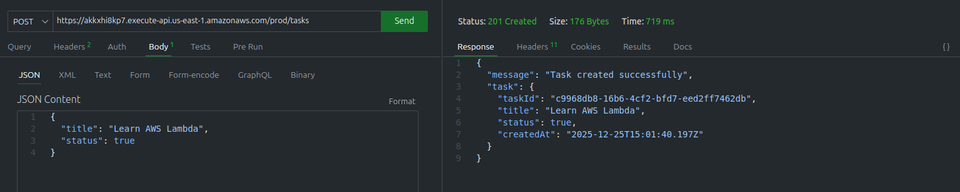
List all tasks
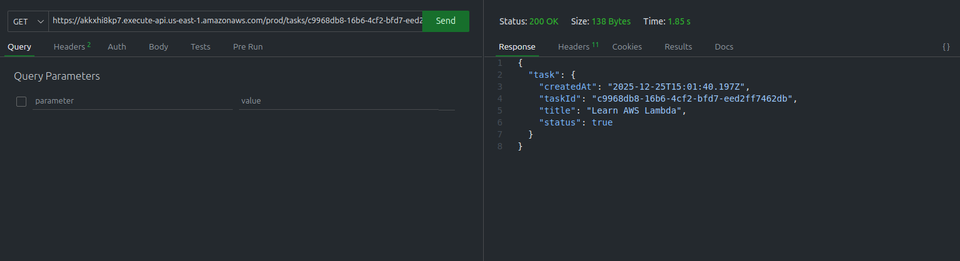
Get Task
Update Task
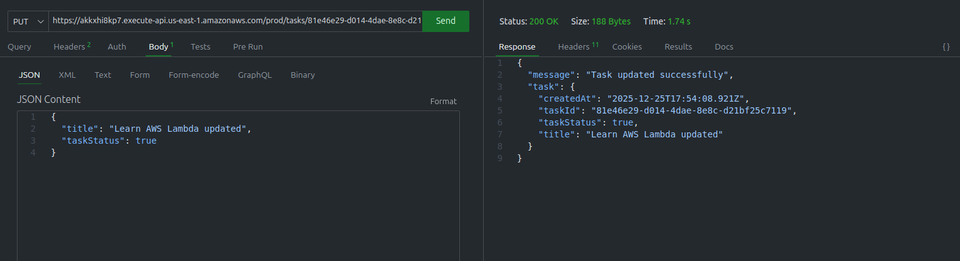
Delete Task


6. Clean Up
cdk destroyThis deletes the Lambda functions, the API Gateway resources, and the DynamoDB table.
Conclusion
In this article, we have :
- Created an AWS CDK project in TypeScript
- Created our Lambda functions
- Created our REST API
- Connected our endpoints to the Lambda functions
- Deployed our CDK stack
- Tested our API
- Code Gitlab
DynamoDB is the key data storage service for serverless applications. In this article, it is important to note that we have only covered its basic usage. To learn more, I encourage you to check out the official documentation.
The next step in our journey will be the deployment of a static website. Since we have created a REST API, it is now time to deploy an Angular or React application to interact with our REST API.
Comments