
Daily Actions: Secure your Next.js application with AWS Cognito and CDK
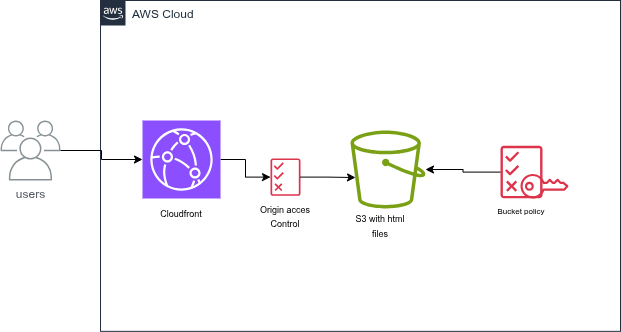
Now that our Next.js application is live on S3 and CloudFront, it’s time to add an essential component: authentication. With a static export architecture, traditional server-based solutions (like NextAuth.js with Node.js API routes) do not work directly.
We will use AWS Cognito to manage our users (User Pool) and integrate the AWS SDK (or Amplify) on the front-end to connect our static application securely. CDK handles all the infrastructure configuration.
Important
This second article follows the deployment of our static application (Daily Actions).
Make sure you have cloned the latest Git branch of the project or are starting from your previous structure (/frontend and /infrastructure).
Tutorial Objective
- Deploy a Cognito User Pool and a User Pool Client via CDK.
- Automatically retrieve configuration IDs (User Pool ID, Client ID).
- Configure the Next.js front-end to handle login/signup (UI or SDK).
- Update the global infrastructure in a single command.
Prerequisites
Before starting, you need to:
- Have read this article: Daily Actions: Deploy Next.js on AWS (static export): S3 and CloudFront in 5 minutes with CDK
1. Updating the CDK Infrastructure (Cognito)
Open your infrastructure/lib/infrastructure-stack.ts file and add the Cognito User Pool resource. We will also export the necessary credentials so the front-end knows which User Pool to target.
// create userpool
const userPool = new cognito.UserPool(this, "UserPool", {
  userPoolName: "DailyAppUserPool",
  selfSignUpEnabled: true,
  signInAliases: { email: true },
  autoVerify: { email: true }, // see note 1
  featurePlan: cognito.FeaturePlan.ESSENTIALS, // required for Managed Login
  standardAttributes: {
    email: { required: true, mutable: false },
  },
});

// create user pool client
const userPoolClient = new cognito.UserPoolClient(this, "UserPoolClient", {
  userPoolClientName: "DailyAppUserPoolClient",
  userPool,
  generateSecret: false,
  authFlows: { userSrp: true },
  oAuth: {
    flows: { authorizationCodeGrant: true },
    callbackUrls: [
      `https://${distribution.domainName}/`,
      "http://localhost:3001/", // local dev
    ],
    logoutUrls: [
      `https://${distribution.domainName}/`,
      "http://localhost:3001/",
    ],
    scopes: [
      cognito.OAuthScope.OPENID,
      cognito.OAuthScope.EMAIL,
      cognito.OAuthScope.PHONE,
    ],
  },
});

// Cognito prefix domain + Managed Login engine
const domain = userPool.addDomain("Domain", {
  cognitoDomain: { domainPrefix: "daily-app-auth-xyz" }, // unique per region
  managedLoginVersion: cognito.ManagedLoginVersion.NEWER_MANAGED_LOGIN,
});

// Default branding, the one the console creates for you
const branding = new cognito.CfnManagedLoginBranding(this, "Branding", {
  userPoolId: userPool.userPoolId,
  clientId: userPoolClient.userPoolClientId,
  useCognitoProvidedValues: true,
});
branding.node.addDependency(domain);

new cdk.CfnOutput(this, "CognitoDomainUrl", { value: domain.baseUrl() });

new cdk.CfnOutput(this, "UserPoolId", {
  value: userPool.userPoolId,
});

new cdk.CfnOutput(this, "UserPoolClientId", {
  value: userPoolClient.userPoolClientId,
});

new cdk.CfnOutput(this, "DistributionDomainName", {
  value: distribution.domainName,
});

const config = {
  authority: `https://cognito-idp.${this.region}.amazonaws.com/${userPool.userPoolId}`,
  client_id: userPoolClient.userPoolClientId,
  redirect_uri: "https://" + distribution.domainName + "/",
  response_type: "code",
  scope: "phone openid email",
};

// --- 4. S3 Deployment --- & upload cognito configs
new s3deploy.BucketDeployment(this, "DeployNextApp", {
  sources: [
    s3deploy.Source.asset("../frontend/out"),
    s3deploy.Source.jsonData("config.json", config),
  ],
  destinationBucket: bucket,
  distribution,
  distributionPaths: ["/*"],
});Next.js Front-end Configuration
Since our application is compiled as a static export (output: 'export'), it does not have a Node.js server to inject environment variables at request time.
To bypass this limitation and allow our application to dynamically retrieve our Cognito User Pool URL, we use a config.json file placed in the Next.js root folder, loaded at startup via the main layout (RootLayout).
new s3deploy.BucketDeployment(this, "DeployNextApp", {
  sources: [
    s3deploy.Source.asset("../frontend/out"),
    s3deploy.Source.jsonData("config.json", config),
  ],
  destinationBucket: bucket,
  distribution,
  distributionPaths: ["/*"],
});Installing the OIDC Library
In your frontend folder, install the react-oidc-context package (and oidc-client-ts required as a dependency) to handle OpenID Connect authentication with Cognito:
cd frontend
pnpm install oidc-client-ts react-oidc-contextThe Dynamic RootLayout
Your app/layout.tsx file automatically fetches the config.json file when the application loads, initializes the authentication provider (AuthProvider), and secures the rendering of your interface:
"use client"
import { Geist, Geist_Mono } from "next/font/google"

import "./globals.css"
import { ThemeProvider } from "@/components/theme-provider"
import { cn } from "@/lib/utils"
import { AuthProvider } from "react-oidc-context"
import { QueryClient, QueryClientProvider } from "@tanstack/react-query"
import { useEffect, useState } from "react"

const geist = Geist({ subsets: ["latin"], variable: "--font-sans" })

const fontMono = Geist_Mono({
  subsets: ["latin"],
  variable: "--font-mono",
})

interface Config {
  authority: string
  client_id: string
  redirect_uri: string
  response_type: string
  scope: string
}

const queryClient = new QueryClient()

export default function RootLayout({
  children,
}: Readonly<{ children: React.ReactNode }>) {
  const [config, setConfig] = useState<Config | null>(null)
  const [error, setError] = useState<string | null>(null)

  useEffect(() => {
    fetch("/config.json")
      .then((res) => {
        if (!res.ok) throw new Error(`config.json not found (${res.status})`)
        return res.json()
      })
      .then((data) => setConfig(data))
      .catch((err) => {
        console.error(err)
        setError(err.message)
      })
  }, [])

  return (
    <html
      lang="en"
      suppressHydrationWarning
      className={cn(
        "antialiased",
        fontMono.variable,
        "font-sans",
        geist.variable
      )}
    >
      <body>
        {error ? (
          <p>Configuration error : {error}</p>
        ) : !config ? (
          <p>Loading…</p>
        ) : (
          <AuthProvider {...config}>
            <QueryClientProvider client={queryClient}>
              <ThemeProvider>{children}</ThemeProvider>
            </QueryClientProvider>
          </AuthProvider>
        )}
      </body>
    </html>
  )
}Note
Thanks to this approach, the config.json file automatically generated by your CDK infrastructure script after deployment integrates seamlessly with your static application hosted on S3 and CloudFront.
Using Authentication in a Component (Login Page / Navbar)
const auth = useAuth();

const handleSignIn = () => {
  auth.signinRedirect({ prompt: "login" });
};

const handleSignOut = () => {
  auth.signoutSilent();
};Note
auth.signinRedirect() : Automatically redirects the user to the authentication page hosted by AWS Cognito (or the configured login interface).
auth.signoutSilent() : Signs out the user.
2. Infrastructure Code (CDK)
With the infrastructure update, infrastructure/lib/infrastructure-stack.ts becomes:
import * as cdk from "aws-cdk-lib/core";
import { Construct } from "constructs";
import * as s3 from "aws-cdk-lib/aws-s3";
import * as cloudfront from "aws-cdk-lib/aws-cloudfront";
import * as s3deploy from "aws-cdk-lib/aws-s3-deployment";
import * as origins from "aws-cdk-lib/aws-cloudfront-origins";
import * as cognito from "aws-cdk-lib/aws-cognito";

export class InfrastructureStack extends cdk.Stack {
  constructor(scope: Construct, id: string, props?: cdk.StackProps) {
    super(scope, id, props);

    const bucket = new s3.Bucket(this, "NextAppBucket", {
      removalPolicy: cdk.RemovalPolicy.DESTROY,
      autoDeleteObjects: true,
      blockPublicAccess: s3.BlockPublicAccess.BLOCK_ALL,
      bucketName: "next-app-daily-app",
    });

    const distribution = new cloudfront.Distribution(
      this,
      "NextAppDistribution",
      {
        defaultBehavior: {
          origin: origins.S3BucketOrigin.withOriginAccessControl(bucket),
          viewerProtocolPolicy:
            cloudfront.ViewerProtocolPolicy.REDIRECT_TO_HTTPS,
        },
        defaultRootObject: "index.html",
        errorResponses: [
          {
            httpStatus: 404,
            responseHttpStatus: 404,
            responsePagePath: "/404.html",
          },
        ],
      },
    );

    // create userpool
    const userPool = new cognito.UserPool(this, "UserPool", {
      userPoolName: "DailyAppUserPool",
      selfSignUpEnabled: true,
      signInAliases: { email: true },
      autoVerify: { email: true }, // see note 1
      featurePlan: cognito.FeaturePlan.ESSENTIALS, // required for Managed Login
      standardAttributes: {
        email: { required: true, mutable: false },
      },
    });

    // create user pool client
    const userPoolClient = new cognito.UserPoolClient(this, "UserPoolClient", {
      userPoolClientName: "DailyAppUserPoolClient",
      userPool,
      generateSecret: false,
      authFlows: { userSrp: true },
      oAuth: {
        flows: { authorizationCodeGrant: true },
        callbackUrls: [
          `https://${distribution.domainName}/`,
          "http://localhost:3001/", // local dev
        ],
        logoutUrls: [
          `https://${distribution.domainName}/`,
          "http://localhost:3001/",
        ],
        scopes: [
          cognito.OAuthScope.OPENID,
          cognito.OAuthScope.EMAIL,
          cognito.OAuthScope.PHONE,
        ],
      },
    });

    // Cognito prefix domain + Managed Login engine
    const domain = userPool.addDomain("Domain", {
      cognitoDomain: { domainPrefix: "daily-app-auth-xyz" }, // unique per region
      managedLoginVersion: cognito.ManagedLoginVersion.NEWER_MANAGED_LOGIN,
    });

    // Default branding, the one the console creates for you
    const branding = new cognito.CfnManagedLoginBranding(this, "Branding", {
      userPoolId: userPool.userPoolId,
      clientId: userPoolClient.userPoolClientId,
      useCognitoProvidedValues: true,
    });
    branding.node.addDependency(domain);

    new cdk.CfnOutput(this, "CognitoDomainUrl", { value: domain.baseUrl() });

    new cdk.CfnOutput(this, "UserPoolId", {
      value: userPool.userPoolId,
    });

    new cdk.CfnOutput(this, "UserPoolClientId", {
      value: userPoolClient.userPoolClientId,
    });

    new cdk.CfnOutput(this, "DistributionDomainName", {
      value: distribution.domainName,
    });

    const config = {
      authority: `https://cognito-idp.${this.region}.amazonaws.com/${userPool.userPoolId}`,
      client_id: userPoolClient.userPoolClientId,
      redirect_uri: "https://" + distribution.domainName + "/",
      response_type: "code",
      scope: "phone openid email",
    };

    new s3deploy.BucketDeployment(this, "DeployNextApp", {
      sources: [
        s3deploy.Source.asset("../frontend/out"),
        s3deploy.Source.jsonData("config.json", config),
      ],
      destinationBucket: bucket,
      distribution,
      distributionPaths: ["/*"],
    });
  }
}3. One-Step Deployment
cd infrastructure
npm run deploy:allIn the output, retrieve the CloudFront URL (domain type https://xxxxxxxxxxxx.cloudfront.net/) to launch the application.


5. Cleanup
To avoid ongoing costs after testing:
cd infrastructure
cdk destroyConclusion
In this article we have:
- Added authentication to our app
- GitLab project (cognito branch)
Note
Your interface is ready; the next step is to connect our application to an API Gateway.

Comments