
Daily Actions: Save data in DynamoDB through an API Gateway and Lambda secured by Cognito
In the previous article, our static Next.js application learned to authenticate users with Amazon Cognito. But a login page protects nothing by itself: as long as our backend accepts anonymous requests, anyone can write into our database.
In this article we connect the pieces. The signed-in user will send a new action to an API Gateway endpoint, a Lambda function will insert it into DynamoDB, and only requests carrying a valid Cognito token will get through.
Important
This article follows the Daily Actions series. Start from the project as we left it (/frontend and /infrastructure, with Cognito already deployed).
Tutorial Objective
- Create a DynamoDB table that stores the actions of each user.
- Create a Lambda function that inserts an action.
- Expose it as
POST /actionson an API Gateway protected by a Cognito authorizer. - Call the endpoint from Next.js with the user’s token.
- Check that anonymous requests are rejected.
Prerequisites
- Have read Daily Actions: Secure your Next.js application with AWS Cognito and CDK
- Have a look at Give memory to your API: Build a complete CRUD with DynamoDB and CDK if Lambda + DynamoDB with CDK is new to you.
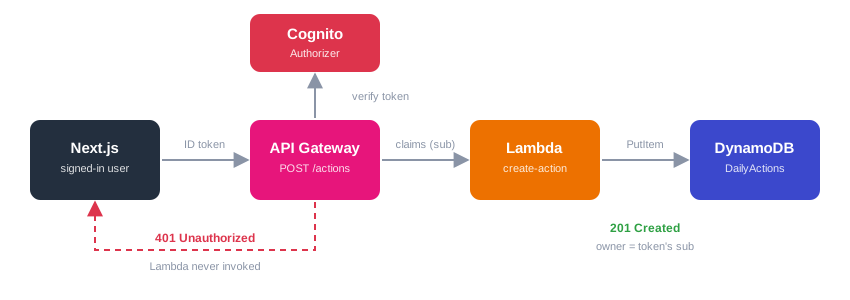
How the request is secured
  sequenceDiagram
    actor U as Browser (signed-in user)
    participant G as API Gateway
    participant C as Cognito authorizer
    participant L as Lambda create-action
    participant D as DynamoDB

    U->>G: POST /actions + Authorization: ID token
    G->>C: Verify the token
    alt token missing or invalid
        C-->>G: Rejected
        G-->>U: 401 Unauthorized (Lambda never invoked)
    else token valid
        C-->>G: Claims (sub, email...)
        G->>L: Invoke with the claims
        L->>D: PutItem
        D-->>L: OK
        L-->>U: 201 Created
    end
The authorizer verifies the token signature, its expiry and its audience against our User Pool. If the check fails, API Gateway answers 401 itself: our code does not run and we are not billed for a Lambda invocation.
1. The DynamoDB table
Each action belongs to a user, so the partition key is the user and the sort key identifies the action. All the actions of one user will live in the same partition and can be read with a cheap Query (we will do it in the next article).
In infrastructure/lib/infrastructure-stack.ts, add the imports:
import * as dynamodb from "aws-cdk-lib/aws-dynamodb";
import * as apigateway from "aws-cdk-lib/aws-apigateway";
import * as lambda from "aws-cdk-lib/aws-lambda";
import * as lambdaNodejs from "aws-cdk-lib/aws-lambda-nodejs";then the table, after the Cognito resources:
const actionsTable = new dynamodb.Table(this, "ActionsTable", {
  tableName: "DailyActions",
  partitionKey: { name: "userId", type: dynamodb.AttributeType.STRING },
  sortKey: { name: "actionId", type: dynamodb.AttributeType.STRING },
  billingMode: dynamodb.BillingMode.PAY_PER_REQUEST,
  removalPolicy: cdk.RemovalPolicy.DESTROY, // tutorial only, not for production
});Note
Choosing keys from your access patterns is the most important DynamoDB decision. If you want the reasoning behind userId + actionId, read How to Design a High-Performance DynamoDB Table.
2. The Lambda function
Install the tooling in the infrastructure folder:
cd infrastructure
npm install -D esbuild @types/aws-lambda
npm install @aws-sdk/client-dynamodbCreate infrastructure/lambda/create-action.ts:
import { randomUUID } from "node:crypto";
import { DynamoDBClient, PutItemCommand } from "@aws-sdk/client-dynamodb";
import type { APIGatewayProxyEvent, APIGatewayProxyResult } from "aws-lambda";

const client = new DynamoDBClient({});
const TABLE_NAME = process.env.TABLE_NAME!;
const ALLOWED_ORIGINS = (process.env.ALLOWED_ORIGINS ?? "").split(",");

const reply = (
  event: APIGatewayProxyEvent,
  statusCode: number,
  body: unknown,
): APIGatewayProxyResult => {
  const origin = event.headers?.origin ?? event.headers?.Origin ?? "";
  return {
    statusCode,
    headers: {
      "Content-Type": "application/json",
      "Access-Control-Allow-Origin": ALLOWED_ORIGINS.includes(origin)
        ? origin
        : ALLOWED_ORIGINS[0],
    },
    body: JSON.stringify(body),
  };
};

export const handler = async (
  event: APIGatewayProxyEvent,
): Promise<APIGatewayProxyResult> => {
  // 1. The identity comes from the verified token, never from the request body
  const userId = event.requestContext.authorizer?.claims?.sub;
  if (!userId) {
    return reply(event, 401, { message: "Unauthorized" });
  }

  // 2. Validate the input
  let body: { title?: unknown; dueDate?: unknown };
  try {
    body = JSON.parse(event.body ?? "{}");
  } catch {
    return reply(event, 400, { message: "Invalid JSON body" });
  }

  const title = typeof body.title === "string" ? body.title.trim() : "";
  if (title.length === 0 || title.length > 120) {
    return reply(event, 400, { message: "title must be 1 to 120 characters" });
  }

  // dueDate is optional, YYYY-MM-DD format
  const dueDate = body.dueDate;
  if (
    dueDate !== undefined &&
    (typeof dueDate !== "string" || !/^\d{4}-\d{2}-\d{2}$/.test(dueDate))
  ) {
    return reply(event, 400, { message: "dueDate must be YYYY-MM-DD" });
  }

  // 3. Insert
  const action = {
    userId,
    actionId: randomUUID(),
    title,
    done: false,
    createdAt: new Date().toISOString(),
    ...(dueDate && { dueDate }),
  };

  try {
    await client.send(
      new PutItemCommand({
        TableName: TABLE_NAME,
        // Each value carries its DynamoDB type: S = string, BOOL = boolean
        Item: {
          userId: { S: action.userId },
          actionId: { S: action.actionId },
          title: { S: action.title },
          done: { BOOL: action.done },
          createdAt: { S: action.createdAt },
          ...(action.dueDate && { dueDate: { S: action.dueDate } }),
        },
        ConditionExpression: "attribute_not_exists(actionId)",
      }),
    );
    return reply(event, 201, { action });
  } catch (error) {
    console.error("Error creating action:", error);
    return reply(event, 500, { message: "Failed to create action" });
  }
};What matters here:
event.requestContext.authorizer.claims.sub: once the Cognito authorizer has validated the token, API Gateway injects its claims in the event.subis the unique, immutable identifier of the user. This is what we store asuserId.- We never read
userIdfrom the body. If we did, any signed-in user could write into someone else’s data by sending another id. - Validation: we reject empty or oversized titles before touching the database.
PutItemCommand: this is the low-level client, so every value is wrapped with its DynamoDB data type:{ S: "text" }for a string,{ BOOL: false }for a boolean.ConditionExpression:PutItemsilently replaces an existing item with the same key. The condition turns an accidental overwrite into an error.reply: the browser calls the API from another origin (CloudFront), so every response must carry aAccess-Control-Allow-Originheader, otherwise the browser hides the response from our JavaScript. We only echo the origin if it is in our allow-list.
3. API Gateway with a Cognito authorizer
Still in the stack, define the function, the API and the authorizer:
const allowedOrigins = [
  `https://${distribution.domainName}`,
  "http://localhost:3001", // local dev
];

const createActionFunction = new lambdaNodejs.NodejsFunction(
  this,
  "CreateActionFunction",
  {
    entry: "lambda/create-action.ts",
    handler: "handler",
    runtime: lambda.Runtime.NODEJS_22_X,
    environment: {
      TABLE_NAME: actionsTable.tableName,
      ALLOWED_ORIGINS: allowedOrigins.join(","),
    },
  },
);

// Least privilege: this function may only call PutItem on this table
actionsTable.grant(createActionFunction, "dynamodb:PutItem");

const api = new apigateway.RestApi(this, "DailyActionsApi", {
  restApiName: "Daily Actions API",
  defaultCorsPreflightOptions: {
    allowOrigins: allowedOrigins,
    allowMethods: ["POST"],
    allowHeaders: apigateway.Cors.DEFAULT_HEADERS, // includes Authorization
  },
});

const authorizer = new apigateway.CognitoUserPoolsAuthorizer(
  this,
  "ActionsAuthorizer",
  { cognitoUserPools: [userPool] },
);

const actions = api.root.addResource("actions");
actions.addMethod(
  "POST",
  new apigateway.LambdaIntegration(createActionFunction),
  {
    authorizer,
    authorizationType: apigateway.AuthorizationType.COGNITO,
  },
);

// Errors generated by API Gateway itself (401, 403...) need CORS headers too
const corsHeader = {
  "Access-Control-Allow-Origin": `'https://${distribution.domainName}'`,
};
api.addGatewayResponse("Unauthorized", {
  type: apigateway.ResponseType.UNAUTHORIZED,
  responseHeaders: corsHeader,
});
api.addGatewayResponse("Default4xx", {
  type: apigateway.ResponseType.DEFAULT_4XX,
  responseHeaders: corsHeader,
});

new cdk.CfnOutput(this, "ApiUrl", { value: api.url });Then give the front-end the API URL, by adding one line to the config.json object from the previous article:
const config = {
  authority: `https://cognito-idp.${this.region}.amazonaws.com/${userPool.userPoolId}`,
  client_id: userPoolClient.userPoolClientId,
  redirect_uri: "https://" + distribution.domainName + "/",
  response_type: "code",
  scope: "phone openid email",
  apiUrl: api.url, // new
};Points worth explaining:
CognitoUserPoolsAuthorizeris the piece that makes the endpoint private. Without theauthorizeroption, the method would be public.- ID token or access token? With no scopes configured on the method, this authorizer expects the ID token in the
Authorizationheader. An access token is only accepted if you declare OAuth scopes on the method, which requires a resource server. The ID token is the simplest option here, andreact-oidc-contextgives it to us directly. actionsTable.grant(fn, "dynamodb:PutItem")is stricter thangrantWriteData, which also allows deletes and updates. A function that only inserts should only be able to insert.- CORS has two sides: the preflight
OPTIONSrequest (handled bydefaultCorsPreflightOptions, and never authenticated), and the headers on real responses (ourreplyfunction for the Lambda,addGatewayResponsefor the errors API Gateway produces by itself).
4. Calling the API from Next.js
The layout already loads config.json. We now need the apiUrl in other components, so we expose the config through a small React context.
Create lib/config.ts:
import { createContext, useContext } from "react";

export interface AppConfig {
  apiUrl: string;
}

export const ConfigContext = createContext<AppConfig | null>(null);

export function useAppConfig() {
  const config = useContext(ConfigContext);
  if (!config)
    throw new Error("useAppConfig must be used inside ConfigContext");
  return config;
}In app/layout.tsx, split the config: the OIDC part goes to AuthProvider, apiUrl goes to our context.
import { ConfigContext } from "@/lib/config"

interface Config {
  authority: string
  client_id: string
  redirect_uri: string
  response_type: string
  scope: string
  apiUrl: string // new
}

// ...inside RootLayout, before the return
const { apiUrl, ...oidcConfig } = config ?? ({} as Config)

// ...then, in place of <AuthProvider {...config}>
<AuthProvider {...oidcConfig}>
  <ConfigContext.Provider value={{ apiUrl }}>
    <QueryClientProvider client={queryClient}>
      <ThemeProvider>{children}</ThemeProvider>
    </QueryClientProvider>
  </ConfigContext.Provider>
</AuthProvider>The project already has a service layer in app/todo: TodoServices talks to the backend, useTodoQuery wraps it with TanStack Query, and the page only calls addTodo. We keep that structure and only change the POST.
In app/todo/services/TodoServices.ts, replace addTodo:
public async addTodo(
  apiUrl: string,
  idToken: string,
  todo: Omit<Todo, "id" | "createdAt">
): Promise<Todo> {
  // The Cognito authorizer expects the ID token, without the "Bearer" prefix
  const response = await fetch(`${apiUrl}actions`, {
    method: "POST",
    headers: {
      "Content-Type": "application/json",
      Authorization: idToken,
    },
    body: JSON.stringify({ title: todo.text, dueDate: todo.dueDate }),
  })
  if (!response.ok) {
    const { message } = await response
      .json()
      .catch(() => ({ message: response.statusText }))
    throw new Error(message)
  }

  // The API returns an "action": convert it to a Todo
  const { action } = await response.json()
  return {
    id: action.actionId,
    userId: action.userId,
    text: action.title,
    completed: action.done,
    dueDate: action.dueDate,
    createdAt: Date.parse(action.createdAt),
  }
}Note
api.url already ends with a /, that is why we write `${apiUrl}actions` and not `${apiUrl}/actions`.
The API speaks in title / done while the front-end model uses text / completed, so addTodo translates in both directions.
Then in app/todo/services/todoQuery.ts, give addTodo the API URL and the ID token. The other calls (fetchTodos, updateTodo, deleteTodo) still target the old backend: we will replace them in the next articles.
import { useAppConfig } from "@/lib/config";

export function useTodoQuery() {
  const auth = useAuth();
  const token = auth.user?.access_token;
  const idToken = auth.user?.id_token; // new
  const { apiUrl } = useAppConfig(); // new
  // ...

  const addTodoMutation = useMutation({
    mutationFn: (newTodo: Omit<Todo, "id" | "createdAt">) =>
      todoServices.addTodo(apiUrl, idToken!, newTodo), // changed
    onSuccess: () => {
      queryClient.invalidateQueries({ queryKey: ["todos"] });
    },
  });
  // ...
}Finally, in app/todo/page.tsx, remove the line userId: \USER#${auth?.user?.profile?.sub}`fromnewTodo(and the now unuseduseAuth`). The backend takes the owner from the token, so the client has nothing to send.
The page itself does not change: its form already calls addTodo with the text and the optional due date.
Warning
The ID token expires (one hour by default). react-oidc-context can renew it silently if you configure automaticSilentRenew; if you get a 401 after a long session, signing in again is the quick fix.
5. Deploy
Build the front-end, then deploy everything with the command from the previous article:
cd infrastructure
npm run deploy:allAt the end, CDK prints the ApiUrl output (https://xxxx.execute-api.<region>.amazonaws.com/prod/).
6. Test it
An anonymous request must fail
curl -i -X POST "https://xxxx.execute-api.<region>.amazonaws.com/prod/actions" \
  -H "Content-Type: application/json" \
-d '{"title":"I am not signed in"}'You should get HTTP/2 401 with {"message":"Unauthorized"}. If you open CloudWatch, there is no log for CreateActionFunction: the request never reached it.
A signed-in request must succeed
Sign in on the CloudFront URL, open the /todo page and add a task: it is saved in DynamoDB (check it with the scan command below). The list will not show it yet, because reading comes in the next article.
To replay the call with curl, copy the ID token from the browser: DevTools → Application → Session Storage → the key starting with oidc.user:, field id_token.
curl -i -X POST "https://xxxx.execute-api.<region>.amazonaws.com/prod/actions" \
  -H "Content-Type: application/json" \
  -H "Authorization: <id_token>" \
-d '{"title":"Write my article"}'Expected: HTTP/2 201 and the created action in the body.
Check the data
aws dynamodb scan --table-name DailyActionsThe item must carry your Cognito sub as userId, not anything sent by the client. Try sending {"title":"x","userId":"someone-else"}: the extra field is ignored.
7. Cleanup
cd infrastructure
cdk destroyConclusion
In this article we have:
- Created a DynamoDB table keyed by user
- Inserted data with a Lambda function behind
POST /actions - Protected the endpoint with a Cognito authorizer, so only authenticated users can write
- Derived the owner of each item from the verified token instead of trusting the client
- Applied least privilege on the IAM permissions and configured CORS properly
- Called the API from Next.js with the user’s ID token
- GitLab project (feat/create-action-lambda branch)
Note
Our users can now save their actions. The next step is to read them back: a GET /actions endpoint that uses a DynamoDB Query on the user’s partition, then update and delete.

Comments