
Next.js on AWS (Static Export): S3 + CloudFront in minutes with CDK
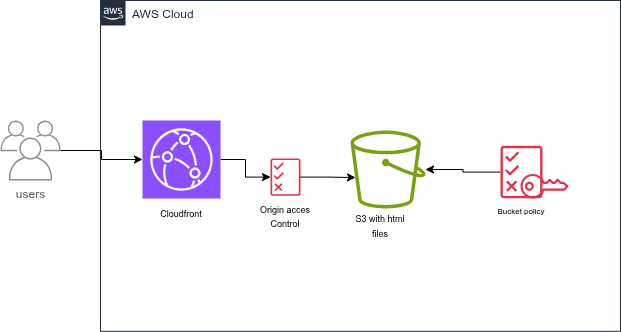
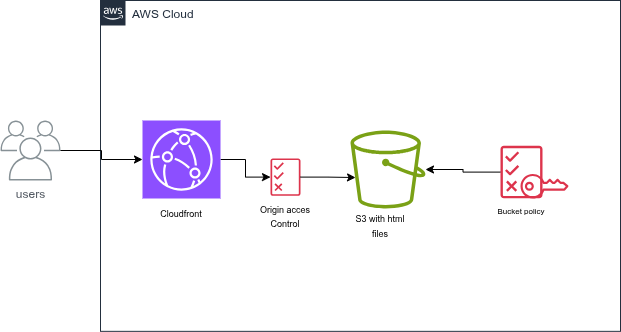
Hosting a Next.js app statically on AWS uses the same building blocks: a private S3 bucket for files, CloudFront for global delivery, and OAC to restrict direct S3 access. We automate everything with the AWS CDK in TypeScript, without depending on Route 53.
This guide scaffolds a Next.js app (static export), then deploys the exported output (out/) to S3 behind CloudFront in one command.
Important
This is the first in a series of articles connected by a project (“Daily Actions”).
It will group multiple modules and let us interact with various AWS services (S3, Lambda, DynamoDB, Cognito) and even AI via AWS Bedrock.
With each step forward, we will create a Git branch as a backup.
Feel free to read the project’s README.md.
Tutorial objectives
- Set up a monorepo with frontend + infrastructure.
- Create a private S3 bucket.
- Configure CloudFront for HTTPS and serve Next.js exported pages.
- Deploy everything with one command.
Prerequisites
You will need:
- Node.js (LTS recommended)
- AWS CLI configured:
aws configure- AWS CDK installed globally:
npm install -g aws-cdk- An active AWS account
npm, orpnpm/yarnfor the frontend
1. Project structure
Keep the app and infrastructure under one root folder:
/host-nextjs-app
├── /frontend          --------------> Next.js app (static export)
└── /infrastructure --------------> AWS CDK codeCreate the root folder and the Next.js frontend
mkdir host-nextjs-app && cd host-nextjs-app
npx create-next-app@latest frontend --typescript --eslint --app
cd frontend && npm install && cd ..Enable static export in Next.js
Edit frontend/next.config.js (or next.config.mjs) and set:
/** @type {import('next').NextConfig} */
const nextConfig = {
  output: 'export',
};

module.exports = nextConfig;After that, run:
cd frontend
npm run buildNext.js will generate the static site in frontend/out/.
Create the infrastructure project
mkdir infrastructure && cd infrastructure
cdk init app --language typescript2. Infrastructure code (CDK)
Open infrastructure/lib/infrastructure-stack.ts. This stack creates the S3 bucket, the CloudFront distribution with OAC, and uploads your Next.js exported output (out/). For missing routes, we map 404 to Next.js 404.html.
import * as cdk from 'aws-cdk-lib/core';
import { Construct } from 'constructs';
import * as s3 from 'aws-cdk-lib/aws-s3';
import * as cloudfront from 'aws-cdk-lib/aws-cloudfront';
import * as s3deploy from 'aws-cdk-lib/aws-s3-deployment';
import * as origins from 'aws-cdk-lib/aws-cloudfront-origins';

export class InfrastructureStack extends cdk.Stack {
  constructor(scope: Construct, id: string, props?: cdk.StackProps) {
    super(scope, id, props);

    const bucket = new s3.Bucket(this, 'NextAppBucket', {
      removalPolicy: cdk.RemovalPolicy.DESTROY,
      autoDeleteObjects: true,
      blockPublicAccess: s3.BlockPublicAccess.BLOCK_ALL,
      bucketName: 'next-daily-app,
    });

    const distribution = new cloudfront.Distribution(this, 'NextAppDistribution', {
      defaultBehavior: {
        origin: origins.S3BucketOrigin.withOriginAccessControl(bucket),
        viewerProtocolPolicy: cloudfront.ViewerProtocolPolicy.REDIRECT_TO_HTTPS,
      },
      defaultRootObject: 'index.html',
      errorResponses: [
        {
          httpStatus: 404,
          responseHttpStatus: 404,
          responsePagePath: '/404.html',
        },
      ],
    });

    // Next.js static export output: frontend/out
    new s3deploy.BucketDeployment(this, 'DeployNextApp', {
      sources: [s3deploy.Source.asset('../frontend/out')],
      destinationBucket: bucket,
      distribution,
      distributionPaths: ['/*'],
    });

    new cdk.CfnOutput(this, 'DistributionDomainName', {
      value: distribution.domainName,
    });
  }
}Note
After npm run build, verify that frontend/out/ contains index.html and 404.html (or at least that a default 404 is generated).
3. One-step deployment
In infrastructure/package.json, add a script that builds the frontend then runs CDK deploy (paths are relative to the infrastructure folder):
"deploy:all": "cd ../frontend && npm run build && cd ../infrastructure && cdk deploy"Then run:
cd infrastructure
npm run deploy:allThe stack output lists the CloudFront URL (for example https://xxxxxxxxxxxx.cloudfront.net/) where the app is served.
4. Pointing your domain (without Route 53) — bonus
If your DNS lives at OVH, GoDaddy, or another provider, add a CNAME record:
- Name:
www(or your subdomain) - Value: the CloudFront domain name from the stack output (for example
d1234567890.cloudfront.net)
Important
To use your own domain name with HTTPS you will need a certificate in AWS Certificate Manager (ACM) attached to the distribution. The default *.cloudfront.net URL already uses HTTPS.
5. Clean up
To avoid ongoing charges after experiments:
cd infrastructure
cdk destroyConclusion
In this article we:
- scaffolded a Next.js app (static export) and produced
out/; - provisioned a private S3 bucket and a CloudFront distribution;
- wired build and deploy through the CDK.
- projet gitlab
Note
With the UI hosted, a natural next step is authentication (for example AWS Cognito) or connecting the app to an API you already run on AWS.

Comments