
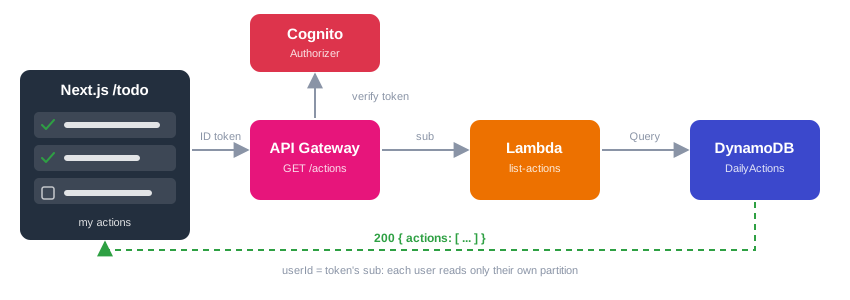
Daily Actions: Read your data back with a DynamoDB Query behind GET /actions
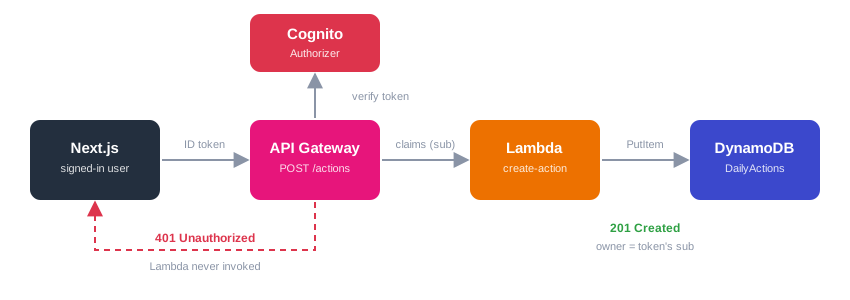
In the previous article, our users learned to write: a signed-in user sends an action to POST /actions, a Lambda stores it in DynamoDB, and anonymous requests are rejected. But if you add a task and refresh the /todo page, the list stays empty. Nothing reads the data back.
In this article we add the missing half: a GET /actions endpoint that returns only the actions of the signed-in user, using a DynamoDB Query.
Important
This article follows the Daily Actions series. Start from the project as we left it in the previous article (branch feat/create-action-lambda).
Tutorial Objective
- Write a Lambda function that reads a user’s actions with a
Query. - Expose it as
GET /actionsbehind the same Cognito authorizer. - Share the response helper between our two Lambdas.
- Display the actions in the Next.js
/todopage. - Check that each user only sees their own data.
Prerequisites
- Have read Daily Actions: Save data in DynamoDB through an API Gateway and Lambda secured by Cognito
- Have a look at How to Design a High-Performance DynamoDB Table for the reasoning behind our keys.
Query or Scan?
DynamoDB has two ways to read many items:
Scan | Query | |
|---|---|---|
| What it reads | The whole table, then filters | Only the items sharing a partition key |
| Cost and speed | Grows with the size of the table | Grows with the size of the result |
| Our case | Would read every user’s data | Reads one user’s partition |
Remember our keys: userId is the partition key and actionId the sort key. All the actions of one user live in the same partition, so one Query on userId returns exactly what we need, and nothing else.
  sequenceDiagram
    actor U as Browser (signed-in user)
    participant G as API Gateway
    participant C as Cognito authorizer
    participant L as Lambda list-actions
    participant D as DynamoDB

    U->>G: GET /actions + Authorization: ID token
    G->>C: Verify the token
    C-->>G: Claims (sub, email...)
    G->>L: Invoke with the claims
    L->>D: Query userId = sub
    D-->>L: The user's items
    L-->>U: 200 { actions: [...] }
1. Share the response helper
Both Lambdas need the same reply function (JSON body and CORS header). Instead of copying it, extract it into infrastructure/lambda/http.ts:
import type { APIGatewayProxyEvent, APIGatewayProxyResult } from "aws-lambda";

const ALLOWED_ORIGINS = (process.env.ALLOWED_ORIGINS ?? "").split(",");

export const reply = (
  event: APIGatewayProxyEvent,
  statusCode: number,
  body: unknown,
): APIGatewayProxyResult => {
  const origin = event.headers?.origin ?? event.headers?.Origin ?? "";
  return {
    statusCode,
    headers: {
      "Content-Type": "application/json",
      "Access-Control-Allow-Origin": ALLOWED_ORIGINS.includes(origin)
        ? origin
        : ALLOWED_ORIGINS[0],
    },
    body: JSON.stringify(body),
  };
};In create-action.ts, delete the local ALLOWED_ORIGINS and reply, and import it instead:
import { reply } from "./http";NodejsFunction bundles each handler with esbuild, so the shared file is included automatically in both functions.
2. The Lambda function
Create infrastructure/lambda/list-actions.ts:
import {
  DynamoDBClient,
  QueryCommand,
  type AttributeValue,
} from "@aws-sdk/client-dynamodb";
import type { APIGatewayProxyEvent, APIGatewayProxyResult } from "aws-lambda";
import { reply } from "./http";

const client = new DynamoDBClient({});
const TABLE_NAME = process.env.TABLE_NAME!;

export const handler = async (
  event: APIGatewayProxyEvent,
): Promise<APIGatewayProxyResult> => {
  // The identity comes from the verified token: a user only reads their own partition
  const userId = event.requestContext.authorizer?.claims?.sub;
  if (!userId) {
    return reply(event, 401, { message: "Unauthorized" });
  }

  try {
    const items: Record<string, AttributeValue>[] = [];
    let lastKey: Record<string, AttributeValue> | undefined;

    // A Query returns at most 1 MB: follow LastEvaluatedKey until it is empty
    do {
      const result = await client.send(
        new QueryCommand({
          TableName: TABLE_NAME,
          KeyConditionExpression: "userId = :userId",
          ExpressionAttributeValues: { ":userId": { S: userId } },
          ExclusiveStartKey: lastKey,
        }),
      );
      items.push(...(result.Items ?? []));
      lastKey = result.LastEvaluatedKey;
    } while (lastKey);

    // Convert DynamoDB types ({ S: ... }, { BOOL: ... }) to plain JSON
    const actions = items
      .map((item) => ({
        userId: item.userId.S!,
        actionId: item.actionId.S!,
        title: item.title.S!,
        done: item.done?.BOOL ?? false,
        createdAt: item.createdAt.S!,
        ...(item.dueDate?.S && { dueDate: item.dueDate.S }),
      }))
      .sort((a, b) => b.createdAt.localeCompare(a.createdAt)); // newest first

    return reply(event, 200, { actions });
  } catch (error) {
    console.error("Error listing actions:", error);
    return reply(event, 500, { message: "Failed to list actions" });
  }
};What matters here:
- The
userIdin the key condition comes from the token, exactly as in the write endpoint. There is no query string parameter to tamper with: a user cannot ask for someone else’s partition. KeyConditionExpressiontargets the partition key.:userIdis a placeholder whose value is passed separately, with its DynamoDB type ({ S: ... }).- Pagination. A single
Querycall returns at most 1 MB of data. When there is more, DynamoDB setsLastEvaluatedKey, and we pass it back asExclusiveStartKeyto get the next page. Ignoring this works in a tutorial and silently loses data in production. - Sorting. The items come back ordered by the sort key (
actionId), which is a random UUID, so that order means nothing to a user. We sort bycreatedAtin the Lambda, newest first.
Note
Sorting in the Lambda is fine for a personal to-do list. For very large lists, you would choose a sort key that already gives the order you need, such as a time-ordered id, and let DynamoDB sort for free. That is the access-pattern thinking from the table design article.
3. Add the route in the stack
In infrastructure/lib/infrastructure-stack.ts, create the function after createActionFunction:
const listActionsFunction = new lambdaNodejs.NodejsFunction(
  this,
  "ListActionsFunction",
  {
    entry: "lambda/list-actions.ts",
    handler: "handler",
    runtime: lambda.Runtime.NODEJS_22_X,
    environment: {
      TABLE_NAME: actionsTable.tableName,
      ALLOWED_ORIGINS: allowedOrigins.join(","),
    },
  },
);

// Read only: Query is enough, no Scan
actionsTable.grant(listActionsFunction, "dynamodb:Query");Allow GET in the CORS preflight:
allowMethods: ["GET", "POST"],and attach the method to the existing /actions resource, with the same authorizer:
actions.addMethod(
  "GET",
  new apigateway.LambdaIntegration(listActionsFunction),
  {
    authorizer,
    authorizationType: apigateway.AuthorizationType.COGNITO,
  },
);Notice the permissions: create-action can only PutItem, list-actions can only Query. Neither can delete, update or scan. If one function is ever compromised, the damage is limited to what it needs.
4. Display the actions in Next.js
The front-end already has the structure: TodoServices talks to the API, useTodoQuery wraps it with TanStack Query, and the page only displays todos. We only change the read path.
In app/todo/services/TodoServices.ts, extract the conversion from API format (title / done) to our model (text / completed) in a function used by both addTodo and fetchTodos:
function toTodo(action: {
  actionId: string
  userId: string
  title: string
  done: boolean
  dueDate?: string
  createdAt: string
}): Todo {
  return {
    id: action.actionId,
    userId: action.userId,
    text: action.title,
    completed: action.done,
    dueDate: action.dueDate,
    createdAt: Date.parse(action.createdAt),
  }
}Then replace fetchTodos, which still targeted localhost:3000:
public async fetchTodos(apiUrl: string, idToken: string): Promise<Todo[]> {
  const response = await fetch(`${apiUrl}actions`, {
    headers: { Authorization: idToken },
  })
  if (!response.ok) {
    const { message } = await response
      .json()
      .catch(() => ({ message: response.statusText }))
    throw new Error(message)
  }

  const { actions } = await response.json()
  return actions.map(toTodo)
}and in addTodo, replace the manual conversion with return toTodo(action).
Finally, in app/todo/services/todoQuery.ts, give the query the API URL and the ID token. Notice enabled too: the query only runs once the token exists.
const todosQuery = useQuery({
  queryKey: ["todos"],
  queryFn: async () => todoServices.fetchTodos(apiUrl, idToken!),
  enabled: !!idToken,
})addTodoMutation already calls invalidateQueries({ queryKey: ["todos"] }) on success. That is the payoff of this structure: after you add a task, TanStack Query automatically re-fetches the list through GET /actions, and the new task appears with no extra code.
Note
updateTodo and deleteTodo still target the old backend. Checking a task or deleting it will not work yet: that is the subject of the next article.
5. Deploy
cd infrastructure
npm run deploy:allCDK adds the new function and the GET method to the existing API. The ApiUrl output does not change.
6. Test it
An anonymous request must fail
curl -i "https://xxxx.execute-api.<region>.amazonaws.com/prod/actions"You should get HTTP/2 401, and no log for ListActionsFunction in CloudWatch.
A signed-in request returns your actions
Sign in on the CloudFront URL, open /todo: the tasks you created in the previous article are listed. Add one more and it appears immediately.

To replay the call with curl, copy the ID token (DevTools → Application → Session Storage → key starting with oidc.user:, field id_token):
curl -i "https://xxxx.execute-api.<region>.amazonaws.com/prod/actions" \
-H "Authorization: <id_token>"Expected: HTTP/2 200 and {"actions":[...]}, newest first.
Each user only sees their own data
Create a second account (another email), sign in and open /todo: the list is empty, even though the table contains the first user’s items. Check it:
aws dynamodb scan --table-name DailyActionsThe table holds both users’ items, but each user only gets their own partition.
7. Cleanup
cd infrastructure
cdk destroyConclusion
In this article we have:
- Read a user’s data with a DynamoDB
Queryinstead of aScan - Handled pagination with
LastEvaluatedKey - Exposed
GET /actionsbehind the same Cognito authorizer - Kept least privilege: one function can only write, the other can only query
- Shared the response helper between Lambdas
- Displayed the actions in Next.js, with the list refreshing itself after each insert
- GitLab project (feat/list-actions-lambda branch)
Note
Our users can now save and read their actions. The next step completes the CRUD: PUT /actions/{id} to check a task as done and DELETE /actions/{id} to remove it, with a check that the item really belongs to the caller.

Comments