
Build your first serverless API with API Gateway and Lambda function using CDK and TypeScript
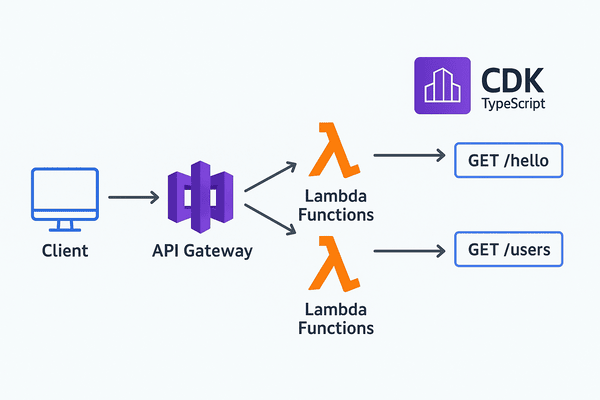
Serverless is one of the most powerful approaches for building fast ,scalable and cost effective applications . In this article, I will walk you through building a simple API with two endpoints in under 10 minutes . We will leverage AWS lambda and Amazon API Gateway, deploying the entire infrastructure using AWS CDK with TypeScript.
Tutorial Goals
In this guide, we will build a REST API featuring two specific routes:
- GET /hello —-> Returns a “Hello from aws lambda” message.
- GET /users —-> Returns a mock list of users.
This Api serves as a robust foundation for your serverless projects or compelling way to showcase your expertise.
Prerequisites
Before getting started,ensure you to have the following:
- Node.js ( LTS versions recommended)
- AWS CLI configured with appropriate credentials:
aws configure- AWS CDK CLI installed globally
npm install -g aws-cdk- An active AWS account
1. Initialize The CDK project
First, create a dedicated directory for your project and navigate into it:
mkdir serverless-api-demo
cd serverless-api-demoThen ,initialize a new CDK app using TypeScript:
cdk init app --language typescriptCDK will generate the following project structure:
/bin————–> The entry point of the CDK application/lib————–> Where your stack definitions residecdk.json————-> The CDK configuration file, defining how the toolkit interacts with your apptsconfig.json——–> The TypeScript configuration for the projectpackage.json——–> Defines your project dependencies and scripts
2. Create the Lambda Function
Next we need to write the business logic for our API. Create a /lambda directory at root of your project and add the file named hello.ts.
mkdir lambda
touch lambda/hello.tsAdd the following snippet to your hello.ts file
//lambda/hello.ts

//hello fonction
export const helloFunction = async()=> {
    return {
        statusCode: 200,
        body: JSON.stringify({message: "hello world from aws lambda "}),
    }
};


// get users fonction
export const getUsersFunction = async()=>{
    const users = [
        {
            id : 1,
            name: "lonfo"
        },
        {
            id : 2,
            name : "ainix"
        },
        {
            id : 3,
            name: "pascal"
        }
    ];

    return {
        statusCode: 200,
        body: JSON.stringify( users),
    };
}This file contains the logic for our two Lambda handlers : helloFunction and getUsersFunction
Tip
while we are keeping them together for simplicity, each function could and ideally should be placed in a separate file . This modular approach is the recommended best practice for maintaining and scaling serverless applications
3. Define the lambda functions in CDK
Now open the lib/serverless-api-demo-stack.ts file and replace its content with the following code to provision our resources:
import * as cdk from 'aws-cdk-lib/core';
import { Construct } from 'constructs';
import * as nodeJsLambda from 'aws-cdk-lib/aws-lambda-nodejs';
import * as apigateway from 'aws-cdk-lib/aws-apigateway';

export class ServerlessApiDemoStack extends cdk.Stack {
  constructor(scope: Construct, id: string, props?: cdk.StackProps) {
    super(scope, id, props);

    // Hello Lambda Function
    const helloLambda = new nodeJsLambda.NodejsFunction(this, 'HelloHandler', {
      entry: 'lambda/hello.ts',
      handler: 'helloFunction',
      functionName: 'helloFunction',
    });

    // Get Users Lambda Function
    const getUsersLambda = new nodeJsLambda.NodejsFunction(this, 'GetUsersHandler', {
      entry: 'lambda/hello.ts',
      handler: 'getUsersFunction',
      functionName: 'getUsersFunction',
    });

    // create API Gateway and integrate with Lambda functions

    const api = new apigateway.RestApi(this, 'ServerlessApiDemoApi', {
      restApiName: 'Serverless API Demo Service',
    });

    // Hello endpoint
    const helloIntegration = new apigateway.LambdaIntegration(helloLambda);
    api.root.addResource('hello').addMethod('GET', helloIntegration);

    // Get Users endpoint
    const getUsersIntegration = new apigateway.LambdaIntegration(getUsersLambda);
    api.root.addResource('users').addMethod('GET', getUsersIntegration);
  }
}Summary of the infrastructure:
- Lambda functions : definition of
helloLambdaandgetUsersLambda - API Gateway: creation of a REST API instance named
api - Route & integration Creation of the
/helloand/usersresources, mapping them to their respective Lambda function as event triggers
4. Deploy the infrastructure
Before deploying execute:
cdk bootstrap
cdk synth

cdk deploy 5. Testing the API
Once the deployment is complete, the terminal wotll display the output section,containing the API gateway endpoint URL. You can use this base URL to call your lambda function.
// replace  xxxxxxxxxxx with the data contained in your URL

curl https://xxxxxxxxxxx.execute-api.us-east-1.amazonaws.com/prod/hello |jq
curl https://xxxxxxxxxxx.execute-api.us-east-1.amazonaws.com/prod/users |jq
6. Clean-Up
to avoid any unexpected charges on your aws account, make sure to delete the resources created during this tutorial . You can easily tear down the entire stack using the following command
cdk destroyConclusion
In this tutorial, we have successfully:
- Initialized an AWS CDK project using TypeScript.
- Developed two Lambda functions to handle business logic
- Provisioned an Amazon API Gateway with two distinct endpoints :
/helloand/users. - Integrated our API endpoints with their respective Lambda function.
- Deployed our entire cloud infrastructure as code (IAC) using the CDK.
- Validated the setup by testing our Lambda function via the public API endpoints
- Code source on Gitlab
AAmazon API Gateway is a cornerstone of serverless architecture,offering powerful features such as request validation,data transformation, and mapping of requests and responses . It acts as the secure entry point for your application’s logic.
API Gateway Doc To explore further, you can check about the official API Gateway documentation . As a next step,consider integrating an AmazonDynamoDB table to persist your data, turning this simple API into fully functional serverless backend.
Comments