

Donnez de la mémoire à votre API: Créez un CRUD complet avec DynamoDB et CDK"
Dans les précedents articles, nous vous avons introduit progressivement au serverless, en passant par la création et le déploiement d'une fontcion lambda pour le premier acticle, l'ajout d'une api Gateway pour le déclenchement de la lambda poue le second article dans les deux cas, les données retounées étaient des simple mocks. vous avez ainsi aquis de bonnes bases pour passer au niveau supperieur : la persistance des données.
Comme énoncer dans le titre nos allons utiliser DynamoDB et npus resterons toujours dans la meme logique la decouverte de aws cdk.
Objectif du tutoriel
nous allons sur la base des précédents tutoriels créer: une table DynamoDB pour la sauvegarde de nos tâches en base de données
- GET
/tasks—-> une route pour la récupération des tâches en base de donnees - POST
/tasks—-> une route pour la sauvegarde des tâches - PUT
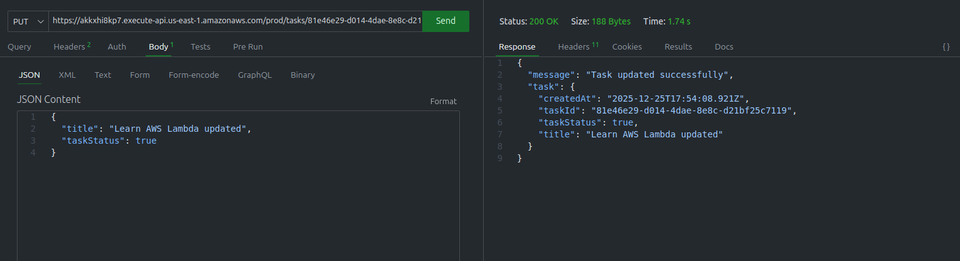
/tasks/:id—> une route pour la mise à jours des informations d’une tâche - DELETE
/tasks/:id—> une route pour la suppression d’une tâche.
Cette Api englobe les elements essentielle a la creation des applications moderne robuste et scalable.
Prérequis
Avant de de commencer il est souhaitable que :
- vous ayer lue les articles:
1. Initialiser le projet CDK
créez un dossier pour votre projet:
mkdir serverless-rest-api-demo
cd serverless-rest-api-demoinitialisez un projet CDK TypeScript:
cdk init app --language typescriptCDK crée la structure suivante:
/bin    --------------> point d'entrée
/lib    --------------> définition des stacks
cdk.json -------------> configuration CDK
tsconfig.json
package.json2. Création de la table DynamoDB
dans notre fichier /lib/serverless-rest-api-demo-stack.ts déclarons notre table Tasks
import * as cdk from 'aws-cdk-lib/core';
import { Construct } from 'constructs';
import * as dynamodb from 'aws-cdk-lib/aws-dynamodb';


export class ServerlessRestApiDemoStack extends cdk.Stack {
  constructor(scope: Construct, id: string, props?: cdk.StackProps) {
    super(scope, id, props);

    const tasksTable = new dynamodb.Table(this, 'TasksTable', {
      partitionKey: { name: 'taskId', type: dynamodb.AttributeType.STRING },
      tableName: 'Tasks',
      removalPolicy: cdk.RemovalPolicy.DESTROY, // NOT recommended for production code
      billingMode: dynamodb.BillingMode.PAY_PER_REQUEST
    });
  }
}Dans cette section de notre Stack CDK, nous definissons notre table de stockage. Voici les details de ceque fait chaque ligne de code:
partitionKey: C’est l’identifiant unique de chaque tâche. Dans DynamoDB, la partition key est obligatoire. Ici nous avons choisitaskIdde typeSTRINGc’est grace à cette clé que nous pourrons retrouver, modifier ou supprimer une tâche precise.tableName: 'Tasks': Nous donnons un nom a notre table DynamoDB pour pouvoir la retrouver facilement dans la console AWS.removalPolicy: cdk.RemovalPolicy.DESTROY: ** Attention , ceci est pour le tutoriel!** Par défaut AWS conserve vos tables même si vous supprimez votre stack CDK ( pour evité de perdre les données par erreur). ici nous demandons explicitement a AWS de supprimer la table en même temps que la stack pour évité de payer pour les resources inutilisées apres vos tests.billingMode: dynamodb.BillingMode.PAY_PER_REQUEST: C’est le mode de facturation. Au lieu de payer un forfait mensuel , vous ne payer que si vous lisez ou écrivez les données. pour un débutant ou un petit projet, c’est l’option la plus économique.
3. Créer les fonctions Lambda
Créer un dossier /lambda/ et les fichers:
create-tasks.tsget-task.tsdelete-task.tslist-tasks.ts
Avertissement
installons les packages qui vont nous facilité les interactions avec notre table DynamoDB et la génération des Id
npm install @aws-sdk/lib-dynamodb
npm install uuid1. Création de la tâche
import { DynamoDBClient } from "@aws-sdk/client-dynamodb";
import { PutCommand ,DynamoDBDocumentClient} from "@aws-sdk/lib-dynamodb";
import { v4 as uuidv4 } from 'uuid';

const client= new DynamoDBClient({});
const docClient =  DynamoDBDocumentClient.from(client);
const TABLE_NAME = process.env.TABLE_NAME || 'Tasks';

export const handler = async (event: any) => {
    const requestBody = JSON.parse(event.body);

    const taskItem = {
        taskId: uuidv4(),
        title: requestBody.title,
        taskStatus: requestBody.taskStatus,
        createdAt: new Date().toISOString()
    };

    try {
        await docClient.send(new PutCommand({
            TableName: TABLE_NAME,
            Item: taskItem
        }));

        return {
            statusCode: 201,
            body: JSON.stringify({ message: 'Task created successfully', task: taskItem })
        };
    } catch (error) {
        console.error('Error creating task:', error);
        return {
            statusCode: 500,
            body: JSON.stringify({ message: 'Failed to create task' })
        };
    }
}- initialisation du client: On prépare la connexion avec DynamoDb en utilisant le
DynamoDBDocumentClient - Preparation des données :
- on transforme le texte reçu(
event.body) en objet exploitable. - On génère un ID unique (
uuid4) pour que chaque tâche soit bien identifiée. - On ajoute une date de création automatique.
- on transforme le texte reçu(
- L’enregistrement(
PutCommand): On envoie l’objettaskItemvers la table DynamoDB. C’est l’action physique d’écriture. - réponse API:
- Succès(201): On confirme au client que la tâche est créée avec son nouvel ID.
- Echec(500): On attrape l’erreur si quelque chose se passe mal (ex: problème de permissions) pour évité que l’API plante sans explications.
2. Liste des tâches
import { DynamoDBClient, ScanCommand } from "@aws-sdk/client-dynamodb";
import {  DynamoDBDocumentClient} from "@aws-sdk/lib-dynamodb";


const client= new DynamoDBClient({});
const docClient =  DynamoDBDocumentClient.from(client);
const TABLE_NAME = process.env.TABLE_NAME || 'Tasks';

export const handler = async (event: any) => {
   try {
       // Scan the DynamoDB table to get all tasks
       const data= await docClient.send( new ScanCommand({
           TableName: TABLE_NAME
       }));

       return {
           statusCode: 200,
           body: JSON.stringify({ tasks: data.Items })
       };
   } catch (error) {
       console.error('Error listing tasks:', error);
       return {
           statusCode: 500,
           body: JSON.stringify({ message: 'Failed to list tasks' })
       };
   }
}Explication du code: Lister toutes les tâches Cette fonction agit comme un inventaire de votre base de données:
ScanCommand: C’est l’instruction qui demande à DynamoDB de lire l’intégralité de la table. Cest la méthode la plus direct pour récuperer toutes les donées d’un coup.data.Items: Le résultat du scan contient untableau nomméItems. C’est là que se trouvent toutes nos tâches ( ID,titre,status etc…)Gestion d'érreur: Si la table est inaccessible ou si le nom est incorect.
Avertissement
La commande Scan est idéale pour l’apretissage et pour les petites tables. Gardez toutefois en tête quil parcourt chaque ligne de latable une par une. Nous verrons plus tard qul existe une commande plus éfficace Query!.
3. Récupération d’une tâche
// code for lambda/get-task.ts
import { DynamoDBClient } from "@aws-sdk/client-dynamodb";
import { DynamoDBDocumentClient ,GetCommand} from "@aws-sdk/lib-dynamodb";

const client = new DynamoDBClient({});
const docClient = DynamoDBDocumentClient.from(client);
const TABLE_NAME = process.env.TABLE_NAME || 'Tasks';

export const handler = async (event: any) => {
    const taskId = event.pathParameters?.taskId;

    if (!taskId) {
        return {
            statusCode: 400,
            body: JSON.stringify({ message: 'Task ID is required' })
        };
    }

    try {
        const data = await docClient.send(new GetCommand({
            TableName: TABLE_NAME,
            Key: { taskId }
        }));

        if (!data.Item) {
            return {
                statusCode: 404,
                body: JSON.stringify({ message: 'Task not found' })
            };
        }

        return {
            statusCode: 200,
            body: JSON.stringify({ task: data.Item })
        };
    } catch (error) {
        console.error('Error getting task:', error);
        return {
            statusCode: 500,
            body: JSON.stringify({ message: 'Failed to get task' })
        };
    }
}Cette fonction permet de récuperer un element precis de notre BD.
- Extraction de L’ID : Le code récupère le
taskIddirectement depuis L’url grâce àevent.pathParameters. - Sécurité d’entrée : Si L’ID est manquant,on renvoie immédiatement une erreur 400 (Mauvaise requête).
GetCommand: C’est la commande la plus rapide et la moin coûteuse su dynamoDb . Elle va directement chercher l’item grâce àsa clé unique.- Vérification d’existance: Si DynamoDB ne trouve rien, il renvoie un objet vide. Le code vérifie le contenu de
data.Itempour envoyer une réponse 404 (Non trouvé), ce qui est la norme pour une API REST bien conçue.
3. Suppression d’une tâche
// code for lambda/delete-task.ts
import { DynamoDBClient } from "@aws-sdk/client-dynamodb";
import { DynamoDBDocumentClient, DeleteCommand } from "@aws-sdk/lib-dynamodb";

const client = new DynamoDBClient({});
const docClient = DynamoDBDocumentClient.from(client);
const TABLE_NAME = process.env.TABLE_NAME || 'Tasks';

export const handler = async (event: any) => {
    const taskId = event.pathParameters?.taskId;

    if (!taskId) {
        return {
            statusCode: 400,
            body: JSON.stringify({ message: 'Task ID is required' })
        };
    }

    try {
        await docClient.send(new DeleteCommand({
            TableName: TABLE_NAME,
            Key: { taskId }
        }));

        return {
            statusCode: 200,
            body: JSON.stringify({ message: 'Task deleted successfully' })
        };
    } catch (error) {
        console.error('Error deleting task:', error);
        return {
            statusCode: 500,
            body: JSON.stringify({ message: 'Failed to delete task' })
        };
    }
}Explication
La suppression est l’action finale de notre cycle de données. Elle ressemble énormément à la récupération (Get), mais avec une intention differente.
- Identification: Comme pour le
Get, nous extrayons letaskIddes paramètres de l’URL. C’est la clé de sécurité qui garanti que nous supprimons le bon élément. DeleteCommand: Cette commande demande à DynamoDB de retirer éfinitivement l’élément associé à la clé fournie.- Résilence: Si vous tentez de supprimer un ID qui n’existe pas, la commande réussira quand même sans erreur. C’est ce qu’on appelle une opération idempotente.
- Confirmation: ON renvoie unn message de succès pour confirmer à l’utilisateur que l’action à bien été prise en compte.
4. Mise à jour Dynamique
// code for lambda/update-task.ts
import { DynamoDBClient } from "@aws-sdk/client-dynamodb";
import { DynamoDBDocumentClient, UpdateCommand } from "@aws-sdk/lib-dynamodb";

const client = new DynamoDBClient({});
const docClient = DynamoDBDocumentClient.from(client);
const TABLE_NAME = process.env.TABLE_NAME || 'Tasks';

export const handler = async (event: any) => {
    const taskId = event.pathParameters?.taskId;
    const requestBody = JSON.parse(event.body);

    if (!taskId) {
        return {
            statusCode: 400,
            body: JSON.stringify({ message: 'Task ID is required' })
        };
    }

    const updateExpressionParts = [];
    const expressionAttributeValues: any = {};

    if (requestBody.title) {
        updateExpressionParts.push('title = :title');
        expressionAttributeValues[':title'] = requestBody.title;
    }

    if (requestBody.taskStatus) {
        updateExpressionParts.push('taskStatus = :taskStatus');
        expressionAttributeValues[':taskStatus'] = requestBody.taskStatus;
    }

    if (updateExpressionParts.length === 0) {
        return {
            statusCode: 400,
            body: JSON.stringify({ message: 'No valid fields to update' })
        };
    }

    const updateExpression = 'SET ' + updateExpressionParts.join(', ');

    try {
        const data = await docClient.send(new UpdateCommand({
            TableName: TABLE_NAME,
            Key: { taskId },
            UpdateExpression: updateExpression,
            ExpressionAttributeValues: expressionAttributeValues,
            ReturnValues: 'ALL_NEW'
        }));

        return {
            statusCode: 200,
            body: JSON.stringify({ message: 'Task updated successfully', task: data.Attributes })
        };
    } catch (error) {
        console.error('Error updating task:', error);
        return {
            statusCode: 500,
            body: JSON.stringify({ message: 'Failed to update task' })
        };
    }
}
Explication
Contrairement au PutCommand qui remplace tout l’objet, l’UpdateCommand permet de ne modifer que les champs envoyés par les utilisateurs (le titre,le status,ou les deux).
- Construction dynamique: Le code regarde ce sui est présent dans le
requestBody. S’il n’y a que le titre, on ne met à jour que le titre Cela évite d’effacer par erreur d’autres données UpdateExpression: C’est une petite phrase magique (ex: SET title= :title ) qui dit a DynamoDB quoi modifier exactementExpressionAttributeValues: Pour des raison de sécurité, on ne met pas les valeurs directement dans la phrase. On utilise des “alias” ( comme:title) pour injecter les données proprement.ReturnValues: 'ALL_NEW': Elle demande à DynamoDB de nous renvoyer l’objet apres la modification.
4. Création des routes
Dans cette section nous allons créer notre Api Gateway puis associer chaque lambda à une route precise.
import * as cdk from 'aws-cdk-lib/core';
import { Construct } from 'constructs';
import * as dynamodb from 'aws-cdk-lib/aws-dynamodb';
import * as apiGateway from 'aws-cdk-lib/aws-apigateway';
import* as lambdaNodejs from 'aws-cdk-lib/aws-lambda-nodejs';

export class ServerlessRestApiDemoStack extends cdk.Stack {
  constructor(scope: Construct, id: string, props?: cdk.StackProps) {
    super(scope, id, props);

    const tasksTable = new dynamodb.Table(this, 'TasksTable', {
      partitionKey: { name: 'taskId', type: dynamodb.AttributeType.STRING },
      tableName: 'Tasks',
      removalPolicy: cdk.RemovalPolicy.DESTROY, // NOT recommended for production code
      billingMode: dynamodb.BillingMode.PAY_PER_REQUEST
    });

    // Lambda function to create a task
    const createTaskFunction = new lambdaNodejs.NodejsFunction(this, 'CreateTaskFunction', {
      entry: 'lambda/create-task.ts',
      handler: 'handler',
      functionName: 'CreateTaskFunction',
      environment: {
        TABLE_NAME: tasksTable.tableName
      }
    });

    // Grant the Lambda function permissions to write to the DynamoDB table
    tasksTable.grantWriteData(createTaskFunction);

    // Lambda function to list tasks
    const listTasksFunction = new lambdaNodejs.NodejsFunction(this, 'ListTasksFunction', {
      entry: 'lambda/list-tasks.ts',
      handler: 'handler',
      functionName: 'ListTasksFunction',
      environment: {
        TABLE_NAME: tasksTable.tableName
      }
    });

    // Grant the Lambda function permissions to read from the DynamoDB table
    tasksTable.grantReadData(listTasksFunction);

    // Lambda function to get a single task
    const getTaskFunction = new lambdaNodejs.NodejsFunction(this, 'GetTaskFunction', {
      entry: 'lambda/get-task.ts',
      handler: 'handler',
      functionName: 'GetTaskFunction',
      environment: {
        TABLE_NAME: tasksTable.tableName
      }
    });

    // Grant the Lambda function permissions to read from the DynamoDB table
    tasksTable.grantReadData(getTaskFunction);

    // Lambda function to delete a task
    const deleteTaskFunction = new lambdaNodejs.NodejsFunction(this, 'DeleteTaskFunction', {
      entry: 'lambda/delete-task.ts',
      handler: 'handler',
      functionName: 'DeleteTaskFunction',
      environment: {
        TABLE_NAME: tasksTable.tableName
      }
    });

    // Grant the Lambda function permissions to delete from the DynamoDB table
    tasksTable.grantWriteData(deleteTaskFunction);

    // Lambda function to update a task
    const updateTaskFunction = new lambdaNodejs.NodejsFunction(this, 'UpdateTaskFunction', {
      entry: 'lambda/update-task.ts',
      handler: 'handler',
      functionName: 'UpdateTaskFunction',
      environment: {
        TABLE_NAME: tasksTable.tableName
      }
    });

    // Grant the Lambda function permissions to update the DynamoDB table
    tasksTable.grantWriteData(updateTaskFunction);

    // create Api Gateway and Lambda functions here
    const api = new apiGateway.RestApi(this, 'TasksApi', {
      restApiName: 'Tasks Service',
      description: 'This service serves tasks.'
    });
    // create tasks resource
    const tasks = api.root.addResource('tasks');

    // POST /tasks - create a new task
    tasks.addMethod('POST', new apiGateway.LambdaIntegration(createTaskFunction));

    // GET /tasks - list all tasks
    tasks.addMethod('GET', new apiGateway.LambdaIntegration(listTasksFunction));

    // /tasks/{taskId} resource
    const singleTask = tasks.addResource('{taskId}');

    // GET /tasks/{taskId} - get a single task
    singleTask.addMethod('GET', new apiGateway.LambdaIntegration(getTaskFunction));

    // DELETE /tasks/{taskId} - delete a task
    singleTask.addMethod('DELETE', new apiGateway.LambdaIntegration(deleteTaskFunction));

    // PUT /tasks/{taskId} - update a task
    singleTask.addMethod('PUT', new apiGateway.LambdaIntegration(updateTaskFunction));

    // Output the API endpoint URL
    new cdk.CfnOutput(this, 'ApiUrl', {
      value: api.url,
      description: 'The URL of the Tasks API'
    });
  }
}Explications: Comme nouvauté ici nous avons
 // Lambda function to create a task
    const createTaskFunction = new lambdaNodejs.NodejsFunction(this, 'CreateTaskFunction', {
      entry: 'lambda/create-task.ts',
      handler: 'handler',
      functionName: 'CreateTaskFunction',
      environment: {
        TABLE_NAME: tasksTable.tableName
      }
    });

    // Grant the Lambda function permissions to write to the DynamoDB table
tasksTable.grantWriteData(createTaskFunction);environmentdans la définition de la fonction lambda nous permet d’ajouter une variable d’environementTABLE_NAMEà notre fonction qui à son tour seras recupéré dans le code par l’expressionconst TABLE_NAME = process.env.TABLE_NAMEtasksTable.grantWriteData(createTaskFunction);Donne à la fonction lambda les permissions néssécaire pour pouvoir ecrire dans la table DynamoDB
En resumé
- création des fonctions lambda
createTaskFunction,listTasksFunction,getTaskFunction,updateTaskFunctionetdeleteTaskFunction - création de l’API gateway
api - creation des routes
/taskset/tasks/{taskId}, association aux lambdas - création de la table DynamoDB
Avertissement
Executer la cmd npm install -D esbuild
esbuild pour la transpilation du typeScript en JS sinon une image docker sera utiliser pour la transpillation ce qui rendrat le deploiement plus long
5. Déployer la Lambda
avant de deployer:
cdk bootstrap
cdk synth   //pour générer le template Cloudformation du projet

cdk deploy 5. Tester les fonctions
Apres le deploiement dans la console on a lien pour appeler les fonctions lambda.
Se rendre dans la console aws pour decouvrir la ressource API Gateway

Test Via les outils comme Postman
- Liste de toutes les tâches (initialement elle est vide).

Ajout de tâches
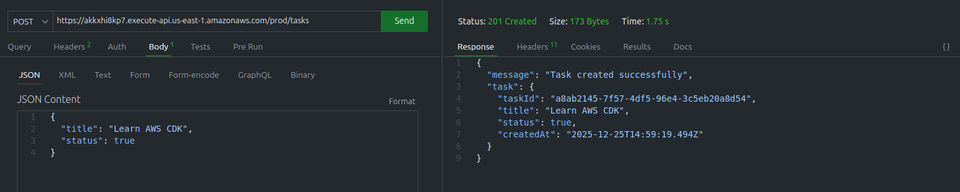
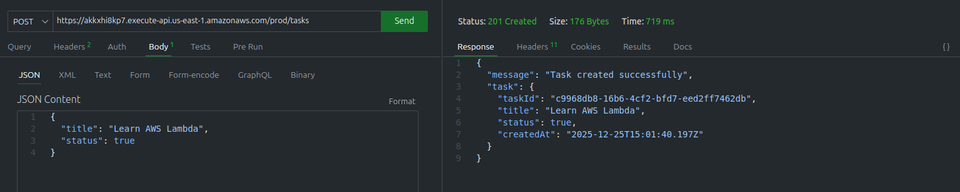
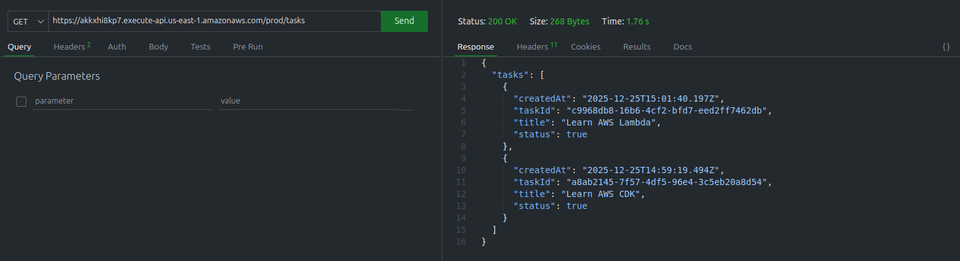
Liste de toutes les tâches
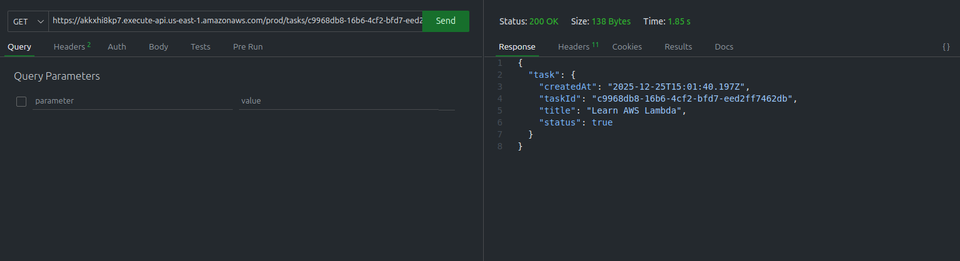
Sélection d’une tâche
mise à jour
Supression


6. Nettoyer
cdk destroycela supprime les fontions lambda les ressource Api Gateway et la table DYnamoDB.
Conclusion
Dans cet article nous avons :
- crée un projet aws cdk en Ts
- Crée nos Fonctions lambda
- crée notre Rest API
- connecter nos endpoins aux fonctions lambda
- déployer notre stack cdk
- tester notre API
- Code disponible Gitlab
DynamoDB est le service de stockage de données clé pour les applications Serverless dans cet article il est important de noté que nous avons juste présenter sonutilisation basique. Pour en savoir plus je vous exorte à regarder dans la documentation.
La prochaine etape de notre parcour sera le déploiement d’un site statique. Comme nous avons crée une api Rest, il est temps de déployer une application Angular ou React pour pouvoir interagir avec notre API Rest.
Commentaires